

Introduction
In today’s digital world, ranking high on Google Maps is essential for local businesses looking to attract more customers. This article provides the 10 best strategies that how to rank on google maps which includes optimizing your Google Business Profile, encouraging customer reviews, building local backlinks, and ensuring NAP consistency. By following these actionable steps, you can enhance your visibility, drive more foot traffic, and grow your local customer base effectively.
10 best Steps to rank on google maps
1.Create or Claim Your Google Business Profile
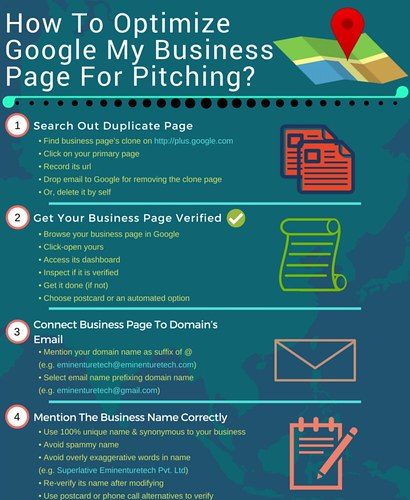
The first step to ranking on Google Maps is creating or claiming your Google Business Profile (formerly known as Google My Business). If your business already exists on Google Maps but you haven’t claimed it, do so immediately. Verifying your business ensures that you can manage how it appears in search results and maps.
-
Key Steps for how to rank on google maps:
– Visit the [Google Business Profile](https://www.google.com/business/) site.
– Enter your business details (address, phone number, hours).
– Verify your business through a postcard, phone, or email.
Once your business profile is claimed and verified, you can start optimizing it for higher rankings.
2. Ensure NAP Consistency for ranking on google maps
NAP stands for Name, Address, and Phone Number, and consistency across the web is critical. Google’s algorithms prioritize businesses that maintain the same information across their website, social media, and third-party listings.
-
Ensure Consistency for how to rank on Google Maps
– Use the exact same name, address, and phone number on all listings.
– Avoid using variations of your business name (e.g., ABC Marketing vs. ABC Digital Marketing).
– Regularly audit your listings to ensure accuracy.
Inconsistent NAP data can confuse Google, making it harder to rank high on Google Maps.
3. Optimize Your Google Business Profile
Filling out your Google Business Profile in detail is essential to improving your Google Maps ranking. This optimization includes adding relevant categories, uploading high-quality images, and writing a compelling business description.
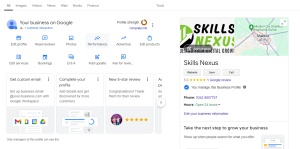
Profile Optimization Tips for how to rank on Google Maps:
– Choose the correct primary and secondary business categories.
– Upload professional photos of your storefront, products, and services.
– Write a description using keywords that potential customers are searching for.
– Set your business hours accurately and update them during holidays or special occasions.
– An optimized profile not only helps with rankings but also provides potential customers with essential details they need.
4. Encourage Customer Reviews
Customer reviews play a significant role in Google Maps rankings. Google’s algorithm values Authentic customer feedback, so the more positive reviews you have, the better.
-
How to Encourage Reviews:
– Ask satisfied customers to leave a review.
– Respond to every review, positive or negative, to show that you value feedback.
– Offer incentives like discounts or promotions to encourage customers to leave reviews (while adhering to Google’s guidelines).
A strong review profile signals to Google that your business is trustworthy and provides quality services.
5. Use Relevant Keywords in Your Profile
To rank high on Google Maps, it’s crucial to incorporate relevant keywords into your business profile. Keywords help Google understand what your business offers and which searches it should appear for.
-
Where to Use Keywords:
– Business description.
– Services section.
– Posts or updates on your profile.
– Reviews and review responses (where relevant).
However, avoid keyword stuffing. Instead, focus on naturally incorporating phrases people would use to find your services.
6. Leverage Local Backlinks
Backlinks remain one of Google’s top ranking factors. A local backlink is when another website links to yours, and it’s particularly powerful when the linking website is a local business, news site, or community blog.
-
Build Local Backlinks for how to rank on Google Maps.
– Partner with local businesses for events or collaborations.
– Get listed on local directories.
– Write guest posts for local blogs or news websites.
Building a strong network of local backlinks helps boost your website’s authority and, consequently, your Google Maps ranking.
7. Embed Google Maps on Your Website
Another useful tip to improve your ranking on Google Maps is to embed your **Google Maps location** directly onto your website. Embedding a map on your contact or location page provides a strong signal to Google that your business is located where you say it is.
-
Embed Google Maps for how to rank on google maps:
– Go to Google Maps and search for your business.
– Click on the “Share” button and select “Embed a map.”
– Copy the provided HTML code and insert it on your website’s contact page.
This can also improve user experience, making it easier for customers to find your location.
8. Utilize Google Posts
Google Business Profile allows you to create **Google Posts**, which are short updates that appear directly in search results and on your Google Maps profile. These posts can include information about upcoming events, promotions, or new product launches.
-
Benefits of Google Posts for how to rank on google maps:
– Keeps your profile active and updated.
– Helps improve engagement with your audience.
– Provides an opportunity to showcase timely offers and announcements.
Consistently posting relevant content can help boost your profile’s activity level and search ranking.
9. Optimize for Mobile
A significant number of users search for local businesses on mobile devices. Thus, mobile optimization of your website and business profile is crucial for your Google Maps ranking.
-
How to Optimize for Mobile:
– Ensure your website is responsive and loads quickly on mobile devices.
– Make sure contact buttons (like call or directions) are easily accessible.
– Use large, easy-to-read fonts and simple navigation.
Mobile optimization improves the user experience and contributes to better search and map rankings.
10. Stay Active and Keep Information Updated
Google rewards businesses that actively maintain and update their profiles. Regularly updating your Google Business Profile with new images, business hours, and posts signals to Google that your business is active and reliable.
-
Ways to Stay Active for how to rank on google maps:
– Update your profile monthly with fresh content or promotions for the purpose of how to rank on google maps.
– Ensure business hours and other details are always current.
– Regularly respond to customer queries and reviews.
Being active on your profile not only helps your ranking but also builds trust with potential customers.
Conclusion
By following these steps, you will get to know that how to rank on google maps .Ranking on Google Maps takes time, effort, and consistent optimization. By following these steps creating a comprehensive business profile, encouraging reviews, maintaining NAP consistency, and optimizing for mobile you’ll be well on your way to a higher Google Maps ranking. Remember, local SEO is an ongoing process, and regular updates and engagement with your business profile will ensure long-term success.